← All resources
✦ NAMECHEAP · DOMAIN ACCESS
ABOUT 2 MINUTES

ADD AUDWAY TO
YOUR DOMAIN.

This lets us connect your website and handle DNS for you. You stay the owner and can remove our access any time. No passwords to share.

▶
VIDEO GUIDE
Coming soon. Until then, the steps below walk you through it.
01
✦ STEP 01

Log in and open your Domain List

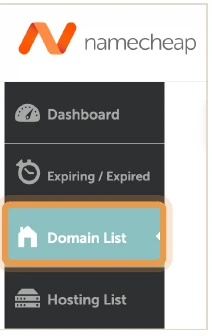
Sign in at namecheap.com, go to your Dashboard, then click Domain List in the left menu.
Dashboard›Domain List›Manage›Sharing & Transfer
Namecheap dashboard menu with Domain List highlighted
02
✦ STEP 02

Click Manage next to your domain

You'll see your website's domain listed. Click the Manage button on the right.

Namecheap domain list row with the Manage button highlighted
03
✦ STEP 03

Add us as a manager

Click the Sharing & Transfer tab. Under Share Access, type our email into the New Manager box and click Add.
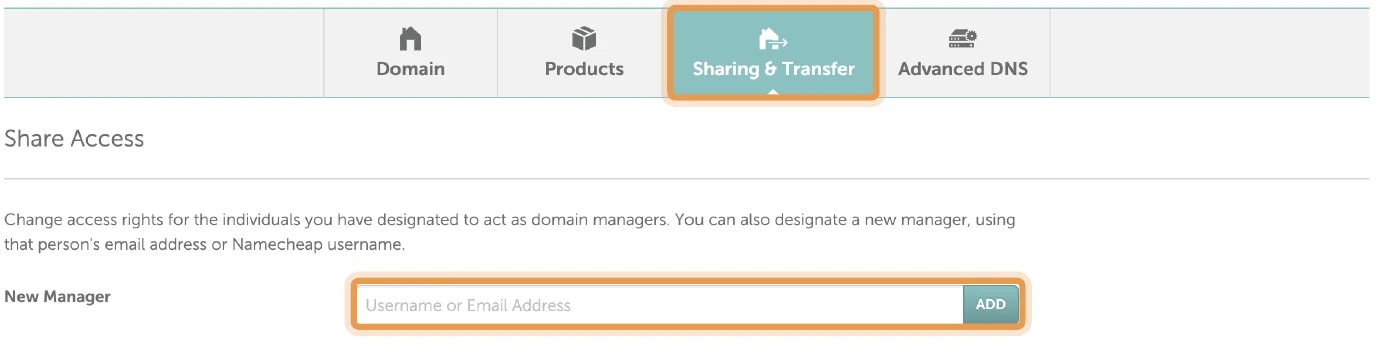
Namecheap Sharing and Transfer tab with the New Manager box highlighted
TYPE THIS INTO THE NEW MANAGER BOX
admin@audwaysolutions.com

THAT'S IT.

we'll take it from here

We'll handle the rest and let you know once we're connected. You stay the owner and can remove our access any time.

BOOK A CALL